
Date Alerts
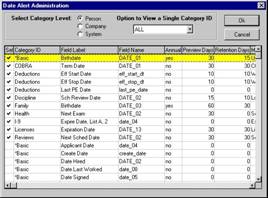

Every date in the system has the ability to generate an alert when user-defined conditions are met.
You can set the alert to notify you 30 days before the date arrives, or whatever advance warning you choose (see the ‘Preview Days’ column).

A daily procedure prints out the alerts that are due by category.
Those date fields with alerts set “on” are identified by a √ in the far left “Sel” column.
Note the ‘Retention Days’ column, this setting allows you to keep the alert on the alert list for a specified number of days – this helps to ensure that the alert wasn’t missed.
