
...Menu...
Cheque/Check Reconciliation
Menu Group: Transaction Processing: Clear Checks
This program allows you to reconcile the checks with
your bank statement. The outstanding checks will be listed in check number
sequence. You can change the sequence to Form Number or Employee Number by
clicking on the appropriate columns.
Note that direct deposits can be optionally included in
the list of outstanding cheques/checks. See Payroll
Settings for more information.
Start by entering the date of the Bank Statement.
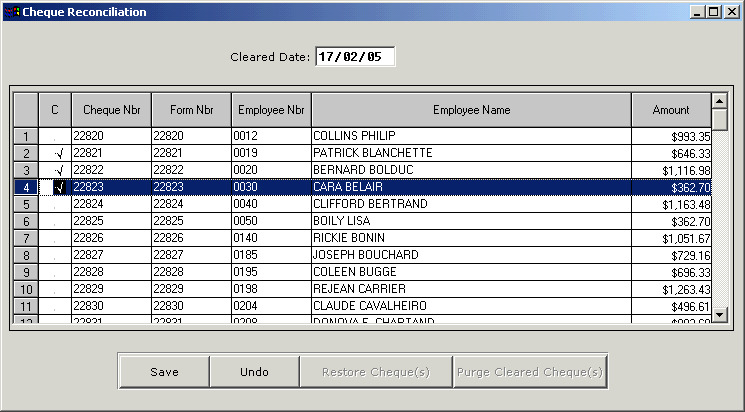
- To clear an individual check just double click
anywhere along the check line. To unclear double click again.
- To clear a consecutive series of checks highlight the
first check in the series and hold down the shift key. Then click the last
check in the series and right click. You will be presented with a pop-up.
Click on the Clear/Unclear option. If the checks have already been cleared
(check mark) you can uncheck them the same way.
- To clear a non-consecutive series of checks highlight
them by holding down the CTRL key and clicking the checks in the series. The
right click to clear/unclear.
- When you are finished click the save button to
register the cleared checks.
- To remove the cleared checks from the list click the
Purge Cleared Checks button.
- To restore checks that have been purged click the
Restore Cheque(s) button and enter the check/cheque numbers to be
restored.
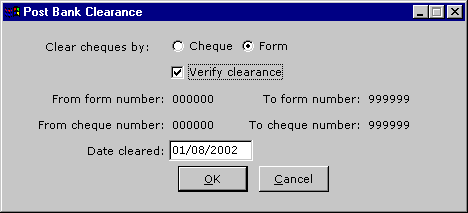
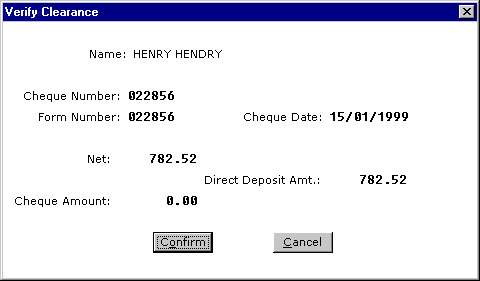
Post Bank Clearance - OLD
Menu Group: Transaction Processing: Clear Checks
Last Update October 20, 2006